SRD Banking Details: How to Add or Change Them
Add or change Social Relief of Distress (SRD) banking details only on the South African Social Security Agency (SASSA) portal at srd.sassa.gov.za, using your ID number and a one-time PIN sent to your registered phone. The account must be active and in your own name — SASSA will not pay into anyone else's account. New details are verified with the bank before use, which can take up to 21 working days.
Update your banking details
Opens the official SASSA portal. SASSA never asks for your PIN or online-banking password.
What do I need before I start?
Tick what you have. Nothing is sent or saved.
Help with each item: Application basics · Change phone number · Account rules · Check current option · Documents list
{"apply":"https://srd.sassa.gov.za/sc19/banking-details-update","after":"https://securethegrant.co.za/srd/banking-details#how-long","cta":"Update details on srd.sassa.gov.za","ready":"You are ready to update your banking details.","fixFirst":"Sort these out first, then update your details:","optional":"Keep a recent bank statement ready if you are on a permanent grant. ","note":"The update is free and only on the official portal.","afterLabel":"how long verification takes","event":"tool_banking_ready"}
What are the rules for an SRD bank account?
- In your own name. A spouse's, parent's or friend's account is rejected.
- Active. SASSA cannot pay into a dormant or closed account, and will not assign a payment date until an active one is confirmed.
- Changed only on the portal. Banking details cannot be changed by WhatsApp, SMS link, phone call or any other website. A message offering to "update your banking details" is a scam.
- Verified before use. SASSA confirms the account with the bank; payments use the new details only after that succeeds.
- Able to receive an EFT. SASSA pays social assistance by electronic funds transfer, so the account has to support it.
For a permanent grant, whether you are applying for the first time or updating your details, SASSA also asks for a recent three-month bank statement from an active account that clearly shows your name and account number. The full list is on documents and qualifying criteria.
SASSA never asks for your PIN
Never share your bank PIN with anyone. SASSA will not request a PIN in any interaction, and does not need one to pay you. Do not give personal details to anyone claiming to represent SASSA until you have verified who they are — report suspected fraud on 0800 701 701.
How do I update my banking details?
- Open the official banking-details page. Go to https://srd.sassa.gov.za/sc19/banking-details-update.
- Choose the option for your ID type. Enter your 13-digit ID number.
- Enter the one-time PIN. It is sent by SMS to the phone number on your application. If you no longer have that number, change your phone number first.
- Enter the new details. Give the bank, account number and type, or choose a cash-send option.
- Accept the declaration. It states that the account is yours and that SASSA may verify it with the bank. Without this the update cannot be submitted.
- Submit and wait for verification. Do not submit the same change repeatedly; each submission restarts the check.
Check your current payment option first
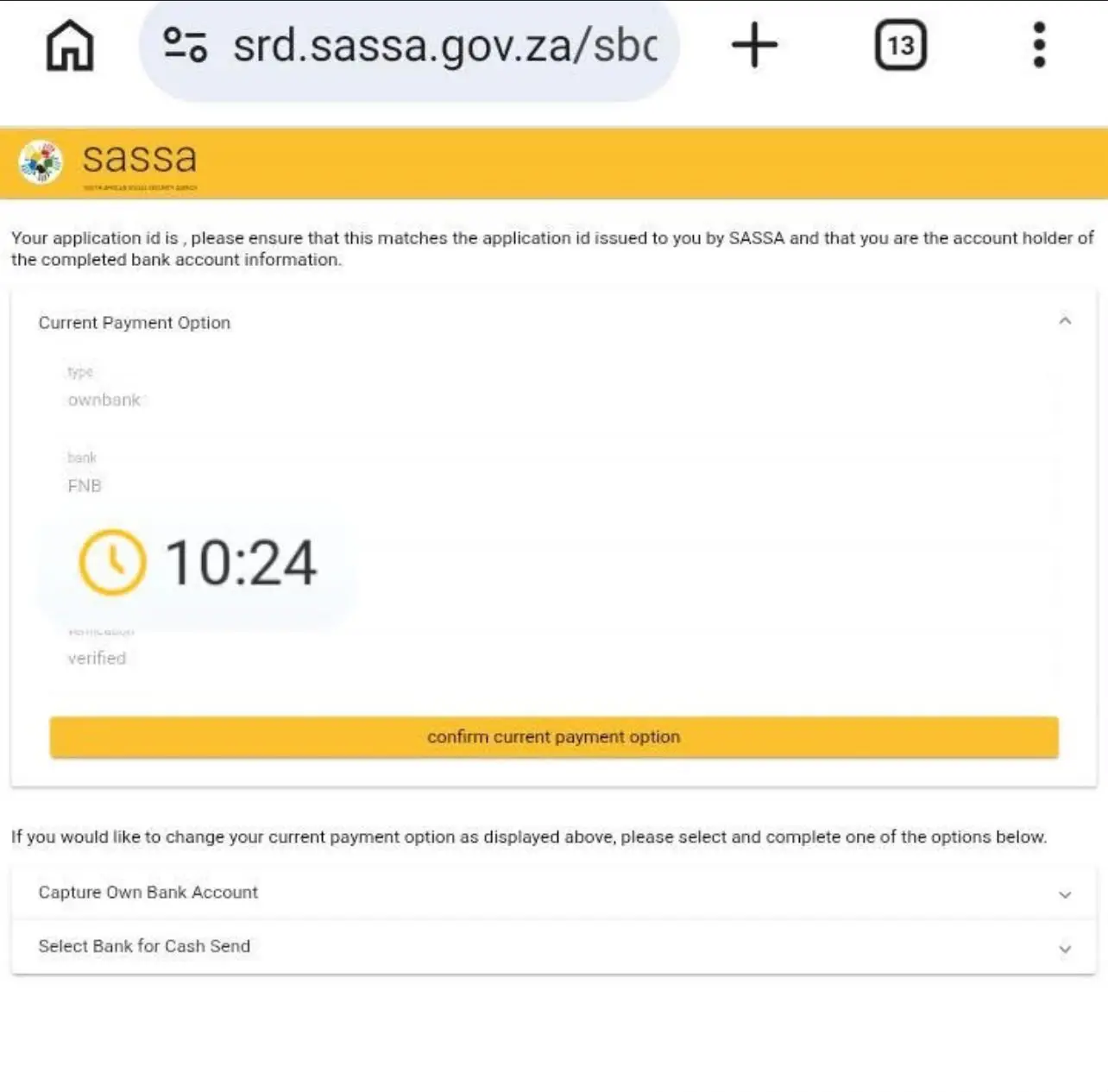
Before you change anything, the page shows your current payment option: the type (your own bank account, or a cash-send bank), the bank, and whether it has been verified. If that is already correct and verified, press confirm current payment option instead of capturing new details — submitting a change you do not need restarts verification and can delay your payment. Only open Capture Own Bank Account or Select Bank for Cash Send if the details shown are wrong.
Which payment methods are available?
- Bank account
- Any South African bank, in your own name. The most reliable option once verified.
- Cash send / cardless payment through a major bank
- A code sent to your phone lets you withdraw at that bank's ATMs without an account. Choose this only if you cannot open an account.
- Postbank card
- For beneficiaries paid through Postbank — see the card change below.
You can switch methods on the same page; the new method is verified before it is used, so expect a short gap.
Does SRD pay into TymeBank and other digital banks?
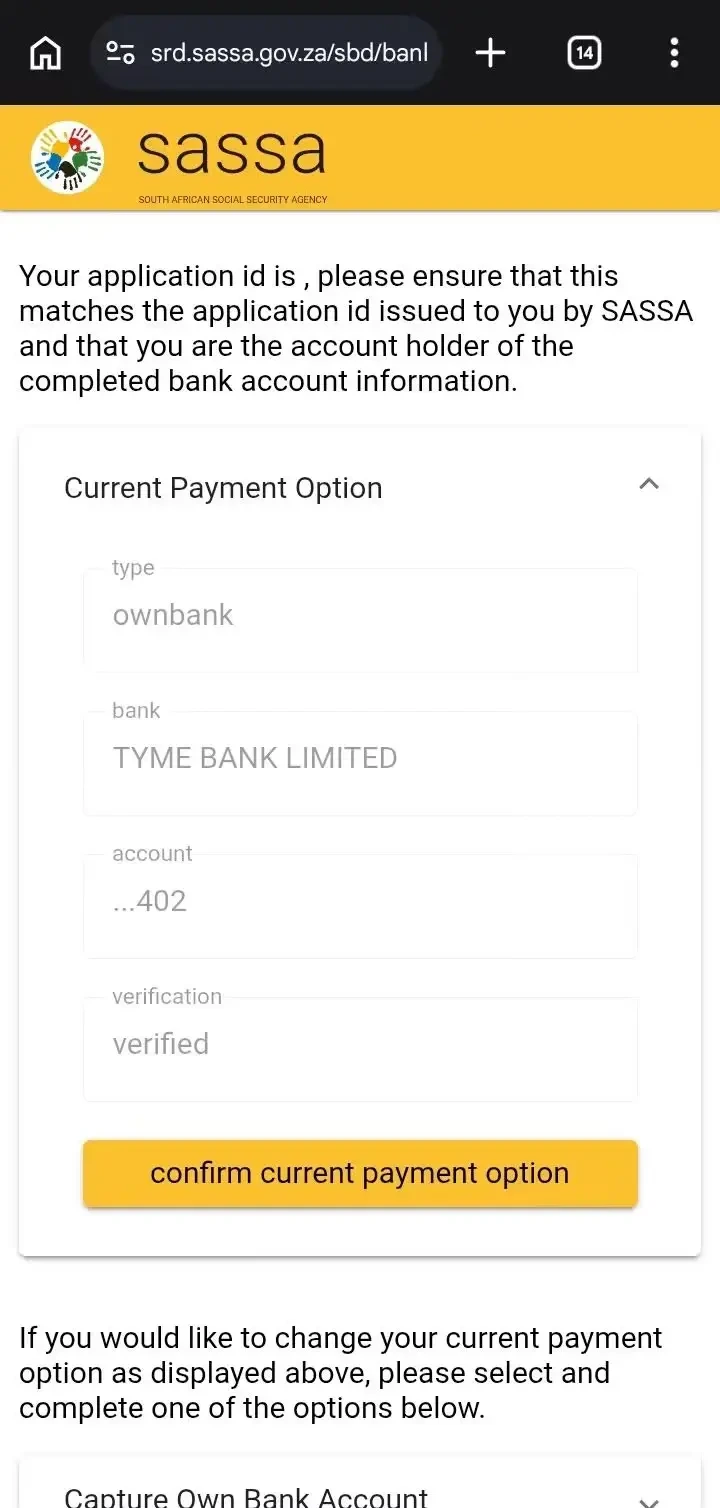
Yes. The portal accepts any South African bank account in your own name, and a digital bank appears the same way as a traditional one. In the screenshot below the current payment option is ownbank, the bank is TYME BANK LIMITED and the verification line reads verified — the state you want before a payment date can be set. If your own screen reads like this, press confirm current payment option rather than capturing the same account again.
How long does verification take?
| Stage | Time | What it means | Guide |
|---|---|---|---|
| A banking change | Up to 7 working days | Processed and verified with the bank. | Steps |
| Full verification on a new application | Up to 21 working days | The account is checked before any payment date is set. | Applying |
| Money after a payment date is assigned | Usually within 3 working days | Depends on your bank. | No payment date |
While verification is running, an approved month can show no payment date — see approved but no payment date.
Which mistakes delay my payment?
| Mistake | What happens | Fix |
|---|---|---|
| Using someone else's account | Payments into an account that is not in your name are rejected. | Use an active account in your own name. |
| Submitting the same change again | Each submission restarts the bank check, so the wait grows. | Submit once and wait up to 7 working days. |
| Changing details that are already correct | A change you did not need restarts verification and can delay your payment. | If the current option reads verified, confirm it. |
| Changing details through WhatsApp or an SMS link | Details are changed only on the official portal. Anything else is a scam. | Use the portal and never share your PIN. |
| Not having the registered phone | The OTP goes to the number on your application, so the update stops. | Change the phone number first. |
What do I see after I submit a change of payment method on SASSA Online Services?
SASSA Online Services is the portal used for permanent grants. It is separate from the SRD portal above and has its own registration. When a request for a change of payment method goes through there, it ends on a confirmation page like the one below.
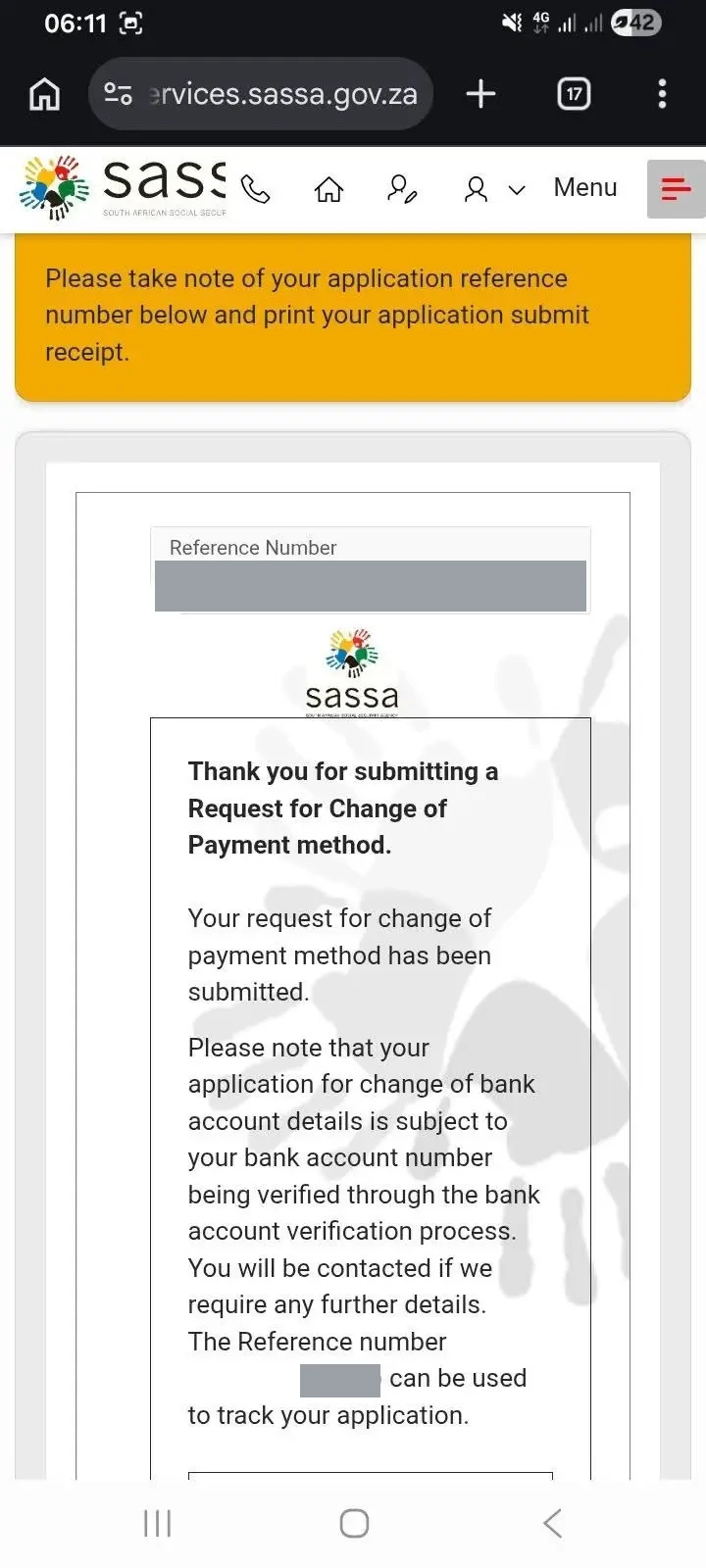
The page says four things:
- Keep the reference number. A yellow banner asks you to take note of your application reference number and print the submit receipt. The page says the number can be used to track your application.
- The request is submitted, not approved. "Your request for change of payment method has been submitted" is a receipt.
- The bank account is verified next. A change of bank account details is subject to the account number passing bank account verification — the same check described above.
- SASSA contacts you if it needs more. The page says you will be contacted if further details are required, so keep the phone number on your application switched on.
Print or screenshot the page and keep the number. Quote it if you call 0800 60 10 11 about the request, and hide it before sharing a screenshot anywhere public.
What happened to the SASSA Gold Card?
SASSA Gold Cards stopped working after 31 August 2026 and have been replaced by the Postbank Black Card. Beneficiaries still paid by Gold Card need the new card from Postbank, or can switch to a bank account of their own on the portal. Nobody will collect your old card or ask for its PIN; anyone who does is a scammer.
Common questions
Can SASSA pay into my mother's or partner's account?
No. The account must be in your own name. Payments into anyone else's account are rejected.
Can I change my banking details by WhatsApp?
No. Only on the official portal, with an OTP. Any WhatsApp, SMS or website offering to change them is a scam.
I changed my details and my approved month has no payment date. Why?
The new details are being verified with the bank, which takes up to 7 working days. The date appears afterwards.
I submitted a change of payment method. What do I do now?
Keep the reference number from the confirmation page and wait for the bank verification. The page says SASSA will contact you if it needs more details. If you call 0800 60 10 11, quote the reference number.
How do I know my banking details are verified?
The banking-details page shows your current payment option with its type, bank and a verification line. It should read verified before a payment date can be set. See where to look.
How long does it take for new banking details to work?
A banking change takes up to 7 working days to process and verify. Full verification on a new application can take up to 21 working days, and money usually arrives within 3 working days after a payment date is assigned.
Should I change my phone number or my banking details first?
The phone number first. The one-time PIN goes to the number on your application, so update the number before the banking details.
Does it cost anything to change my banking details?
No. Every SASSA service, including changing your details, is free. Anyone asking for a fee is not SASSA.
Can I get paid without a bank account?
Yes, through a cash-send option at a major bank: a code sent to your phone lets you withdraw at that bank's ATMs. Choose it only if you cannot open an account.
My SASSA Gold Card stopped working. What do I do?
Gold Cards stopped working after 31 August 2026 and were replaced by the Postbank Black Card. Get the new card from Postbank, or switch to a bank account in your own name on the portal. See the card change.
Why does a form say "Invalid bank details"?
A form that checks your bank against SASSA's records stops if they do not match. Select the bank last saved on your application. Check it under your current payment option.
Can I use a Capitec, TymeBank or other digital bank account?
Yes, any South African bank account in your own name. Verification works the same way — see a verified TymeBank account on the portal.
Sources: srd.sassa.gov.za; SASSA payment and card notices. Last verified August 2026. Spotted something out of date? Tell us and the page is corrected and re-dated.
Reviewed by Haris Shafique, Editorial reviewer against official SASSA sources on . How we check our facts