SRD Identity Verification: How to Complete It
SRD identity verification, or eKYC (electronic Know Your Client), is a facial check SASSA uses to confirm you are the original applicant before paying or changing your details. SASSA sends two SMS messages to your registered number; the second holds a personal link, valid for about 72 hours, which you open on a phone with a camera and data to take the verification photo. Results reflect in 48 hours to 21 working days.
Complete identity verification
Opens the official SASSA verification page. Use a phone with a camera and data.
What do I need before I start?
Tick what you have. Nothing is sent or saved.
Help with each item: Change your number · The steps · Link problems · If it failed · Decline reasons
{"apply":"https://srd.sassa.gov.za/sc19/ekyc","after":"https://securethegrant.co.za/srd/identity-verification#how-long","cta":"Open the verification page","ready":"You are ready to verify.","fixFirst":"Sort these out first, then verify:","note":"Verification is free. Use only the official page or the SMS link SASSA sent you.","afterLabel":"how long results take","event":"tool_ekyc_ready"}
When is identity verification required?
When your details do not match Department of Home Affairs records cleanly, when a month is referred, when you change your phone number or banking details, and at random as a fraud control. eKYC exists to stop someone else using your ID to claim, redirect or check your grant. Until an open verification is completed, an approved month stays unpaid.
How do I complete it?
- Watch your registered phone for two SMS messages from SASSA. The second contains your verification link. It is issued to you alone and does not work on another number.
- Open the link within its validity period. About 72 hours, on a phone with a working camera and mobile data or Wi-Fi.
- Follow the prompts to photograph your face. Good light, no hat or sunglasses, face fully in frame.
- Submit and note the confirmation. Then wait; the result is processed separately from your monthly status.
No link yet? Request verification on the official verification page, which sends the SMS to your registered number.
How long do results take?
| Stage | What happens | Usual time |
|---|---|---|
| The two SMS messages arrive | SASSA sends them to your registered number. The second holds your personal link. | The link is valid for about 72 hours. |
| The face check | You open the link and photograph your face. No documents are uploaded. | Do it within the 72 hours. |
| The result | SASSA reviews the verification separately from your monthly assessment. | 48 hours to 21 working days. |
| Affected months | Once it shows verified, affected months are re-assessed and paid on the next batch if approved. | The next payment batch. |
Check the result on the verification page. Your monthly status may not change immediately, because the verification is reviewed separately from your assessment.
What if the link never arrived, expired, or was deleted?
- Not received
- Confirm the number on your application is the one you are watching, has signal and is not full. Then request a new link on the verification page.
- Expired
- A link not used within its period expires automatically. Request a new one; the old one cannot be reactivated.
- Deleted
- The original link cannot be recovered. Request a new one the same way.
- Sent to an old number
- Change your registered number, then request the link again.
Only SASSA's link
A verification link arrives by SMS from SASSA to your registered number after you or SASSA request it. A link sent by WhatsApp, email, or from a number that contacts you first is a scam designed to capture your face and ID for fraud. See fake status sites.
What if verification failed?
Three causes cover almost every failure:
- Details mismatch. Name, ID or date of birth on the application differ from your ID document. Correct them on the portal and request verification again.
- Photo not accepted. Poor light, partial face, or a different person. Repeat in daylight with your face fully in frame.
- Home Affairs record outdated. Your DHA record has an old photo or wrong details. Visit a Home Affairs office with your ID to update it, then verify again.
A month declined as identity verification failed can be appealed within 90 days once verification succeeds. If your eKYC still shows pending, allow the full 21 working days before appealing on that basis.
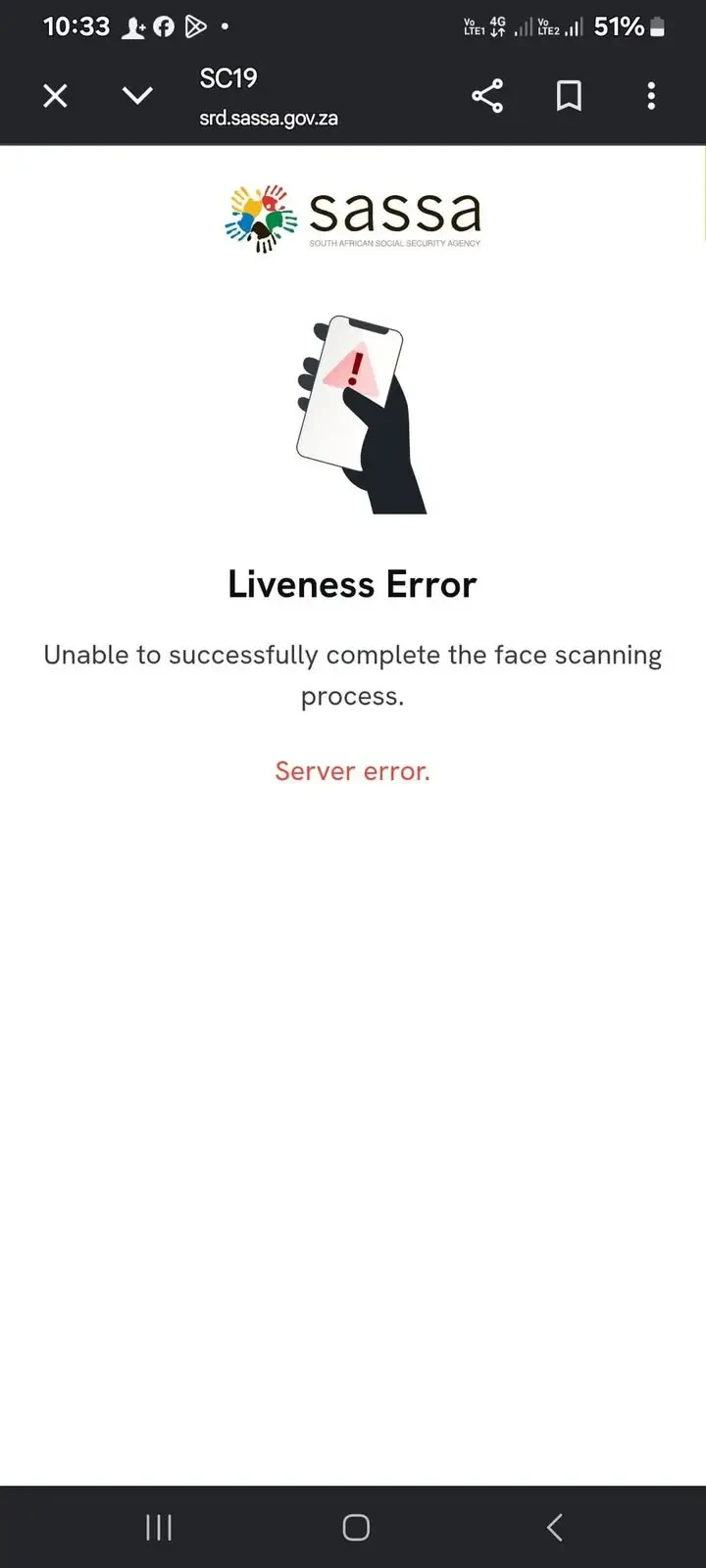
What does "Liveness Error: unable to complete the face scanning process" mean?
The portal shows Liveness Error when the face scan could not be finished. Liveness is the part of the check that confirms a real person is in front of the camera rather than a photo. In the screenshot below the message adds a red Server error. The page does not say whether the fault was on SASSA's side, your connection or your camera, so treat the verification as not completed — an open verification keeps an approved month unpaid.
- Do not keep tapping retry. The portal limits how many attempts you get; once the limit is reached it shows Reverification Not Allowed, below.
- Check your side once. Daylight or a bright room, face fully in the frame, no hat or sunglasses, camera permission allowed for your browser, and a steady connection.
- Try again later, not straight away. The portal is busiest at the start of the month and during the pay run, so an early morning or a quiet day gives the scan the best chance.
- Still failing? Call 0800 60 10 11 (Monday to Friday, 08:00–16:00) or visit a SASSA office with your ID so the check can be completed another way.
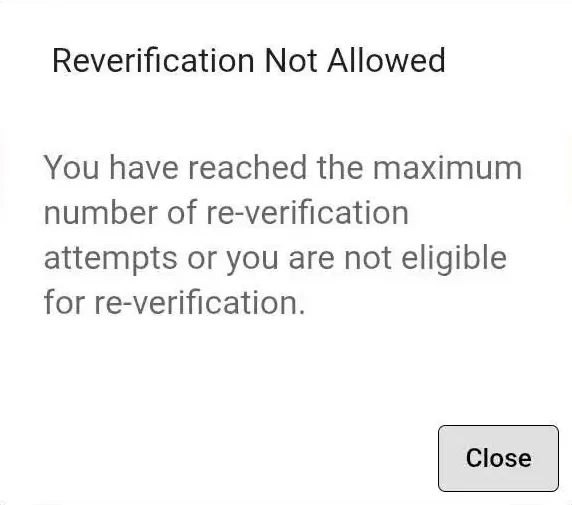
What does "Reverification Not Allowed" mean?
The portal limits how many times you can retry verification. Once the limit is reached — or if your application is not eligible to verify online — it shows Reverification Not Allowed, and trying again online will not work. Stop retrying: call 0800 60 10 11 (Monday to Friday, 08:00–16:00) or visit a SASSA office with your ID so the check can be completed another way.
Common questions
What is eKYC?
eKYC is short for electronic Know Your Client. For the SRD grant it is the facial check SASSA uses to confirm that you are the original applicant, completed through a personal link sent by SMS to your registered number.
Can someone do the verification for me?
No. The check confirms your face against your identity. Another person's photo fails, and sharing your link is how identity fraud happens.
Do I need to upload my ID document?
No. The step photographs your face only. Your ID number is already on the application.
How long is the verification link valid?
About 72 hours. An expired link cannot be reactivated; request a new one on the verification page.
Is the verification link safe to open?
Only if it came by SMS from SASSA to your registered number after you or SASSA requested verification. A link sent by WhatsApp, email or a number that contacted you first is a scam.
How many times can I try?
The portal limits attempts. After the limit it shows Reverification Not Allowed, and you should call 0800 60 10 11 or visit a SASSA office with your ID. See what the message means.
What does "Liveness Error: Server error" mean on the SASSA SRD portal?
The face scan did not finish, and the portal reports a server error rather than a decision about your face. Treat verification as not completed: try once more in good light at a quiet time, and if it keeps failing call 0800 60 10 11 or visit a SASSA office. Do not keep retrying — the portal limits attempts.
I do not have a smartphone. What now?
Visit a SASSA office with your ID. Staff can complete the verification there.
My status is Approved but unpaid, and I got a verification SMS. Are they connected?
Yes. Payment is held until an open verification is completed, even while the month shows Approved.
Sources: SRD verification page; SASSA eKYC process notices. Last verified August 2026. Spotted something out of date? Tell us and the page is corrected and re-dated.
Reviewed by Haris Shafique, Editorial reviewer against official SASSA sources on . How we check our facts