How to Change Your SRD Phone Number
Change the phone number on your Social Relief of Distress (SRD) application only on the South African Social Security Agency (SASSA) portal at srd.sassa.gov.za. You enter your ID, verify your identity, enter the new number, and confirm a one-time PIN sent to it. The new number must be active and in your own name, and once accepted it becomes the only number SASSA uses for status checks, verification links and payment messages.
Change your phone number
Opens the official SASSA portal. Have the new number with you — it receives the OTP.
What do I need before I start?
Tick what you have. Nothing is sent or saved.
Help with each item: Identity check · Number rules · PIN not arriving · Current bank
{"apply":"https://srd.sassa.gov.za/sc19/mobile-number-update","after":"https://securethegrant.co.za/srd/phone-number#how-long","cta":"Change your number on srd.sassa.gov.za","ready":"You are ready to change your number.","fixFirst":"Sort these out first, then change your number:","optional":"Have a phone with a camera ready in case SASSA asks for the face check. ","note":"The change is free and only on the official portal.","afterLabel":"how long the change takes","event":"tool_phone_ready"}
Why does the registered number matter so much?
The registered number is the mobile number held on your SRD application. It is the only number SASSA uses, so losing access to it is the most common reason people cannot update banking details or complete verification.
| Used for | What happens | Guide |
|---|---|---|
| One-time PIN (OTP) | Sent for any change to your application, including banking details and this phone number. | Banking details |
| Identity-verification link | The second SMS from SASSA holds your personal link, valid for about 72 hours. | Identity verification |
| Status checks | Checks by SMS and on the portal only work with the number on record. | Status check |
| Notices and payment messages | Notices about your months and payment messages go to this number. | Approved but no payment date |
How do I change the number?
- Open the official page. Go to https://srd.sassa.gov.za/sc19/mobile-number-update. Select your ID type and enter your 13-digit ID number.
- Verify your identity. A new number is only accepted after identity verification, which may include the facial (eKYC) check — see identity verification.
- Enter the new number. It must be active, registered in your own name, and not a number SASSA has previously flagged or blocked.
- Confirm the one-time PIN. Enter the PIN sent by SMS to the new number.
- Submit. Once processed, the new number replaces the old one everywhere.
Application ID
Some update routes ask for your application ID (AppID). If you do not have it, use the route that verifies by ID number and OTP instead — one successful update on the page that matches your situation is all that is needed.
Why is SASSA telling me to change my number?
If SASSA's fraud checks find a risk with your registered number — for example, it is linked to other people's applications, or shows signs of a SIM swap — you are instructed to change it. The old number cannot be reused; you must provide a new one and verify it by OTP. Payments on affected months resume after the change is accepted. Do this only on the official page above, never through a link someone sends you. See fake status sites for the warning signs.
How long does the change take to reflect?
The update is processed inside SASSA's SRD system after you submit; the new number is usually active for status checks within a few days. Any verification link or OTP sent after that goes to the new number. If you also need to change banking details, do the phone number first — the banking OTP goes to the registered number.
What if the update does not work?
- Check the new number is active, in your name, and can receive SMS.
- Retry outside peak times — the portal is busiest at the start of the month and on payment days.
- If identity verification fails, resolve that first on the verification page.
- Still stuck: call 0800 60 10 11 (Monday to Friday, 08:00–16:00) with your ID, or visit a SASSA office with your ID and the new phone.
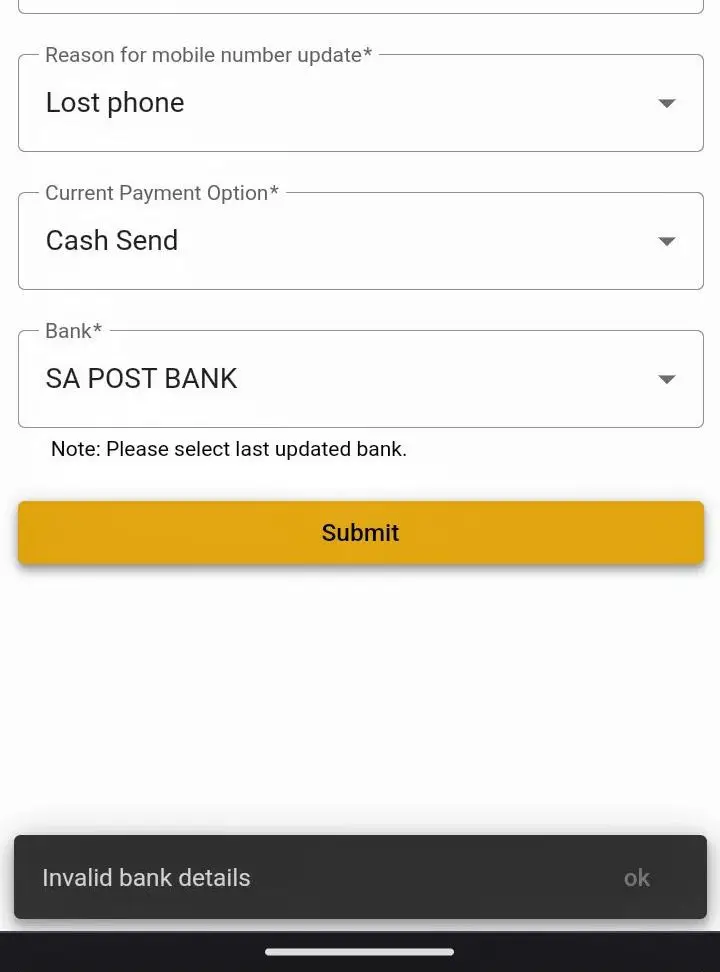
Why does the form say "Invalid bank details"?
The number-update form also asks for your current payment option and bank, and it checks them against what SASSA already holds. If they do not match, it stops with Invalid bank details — even though you are only changing your phone number. The note under the Bank field says it: choose the bank that was last saved on your application, not a new one.
Not sure which that was? The banking-details page shows your current payment option and bank before you change anything. Select exactly that, then submit the number change again.
Common questions
I lost the phone I applied with. Can I still change the number?
Yes. The change page verifies you by ID and identity check, then sends the OTP to the new number, so you do not need the old phone.
Can I use a family member's number?
No. The number must be registered in your own name. SASSA also blocks numbers linked to several applications.
Can I change my number by WhatsApp or at an office?
The change is made on the portal. An office can help if the online route fails, but bring your ID and the new phone.
How long until the new number works?
The new number is usually active for status checks within a few days of submitting. Any OTP or verification link sent after that goes to the new number.
Does the old number stop working?
Yes. Once the change is processed, the new number replaces the old one everywhere. A number SASSA flagged for fraud cannot be reused.
Should I change my phone number or my banking details first?
The phone number first. The one-time PIN for a banking change goes to the registered number, so update the number before the banking details.
Why does the form say "Invalid bank details" when I only want a new number?
The form checks your current payment option and bank against SASSA's records. Select the bank that was last saved on your application, not a new one. See the fix.
Do I need my application ID?
Some update routes ask for it. If you do not have it, use the route that verifies by ID number and OTP instead.
Does it cost anything to change my number?
No. Every SASSA service, including changing your details, is free. Anyone asking for a fee is not SASSA.
Sources: srd.sassa.gov.za mobile-number update pages. Last verified August 2026. Spotted something out of date? Tell us and the page is corrected and re-dated.
Reviewed by Haris Shafique, Editorial reviewer against official SASSA sources on . How we check our facts